Pratibimba: a reflection of your app on every pull request
A reflection of your app on every pull request
What does “Pratibimba” mean?
Pratibimba (Hindi: प्रतिबिंब, pratibimb) means reflection, what you see in a mirror, not the original object itself.
That is the product idea: every pull request gets a short-lived reflection of your application. Same code path you would eventually ship, built into a container by your existing CI, running in its own isolated place on Kubernetes, with a preview URL you can open and test. When the PR merges or closes, the reflection disappears. It is not a second production system, and it is not a replacement for dev, staging, or main.
The problem I was solving
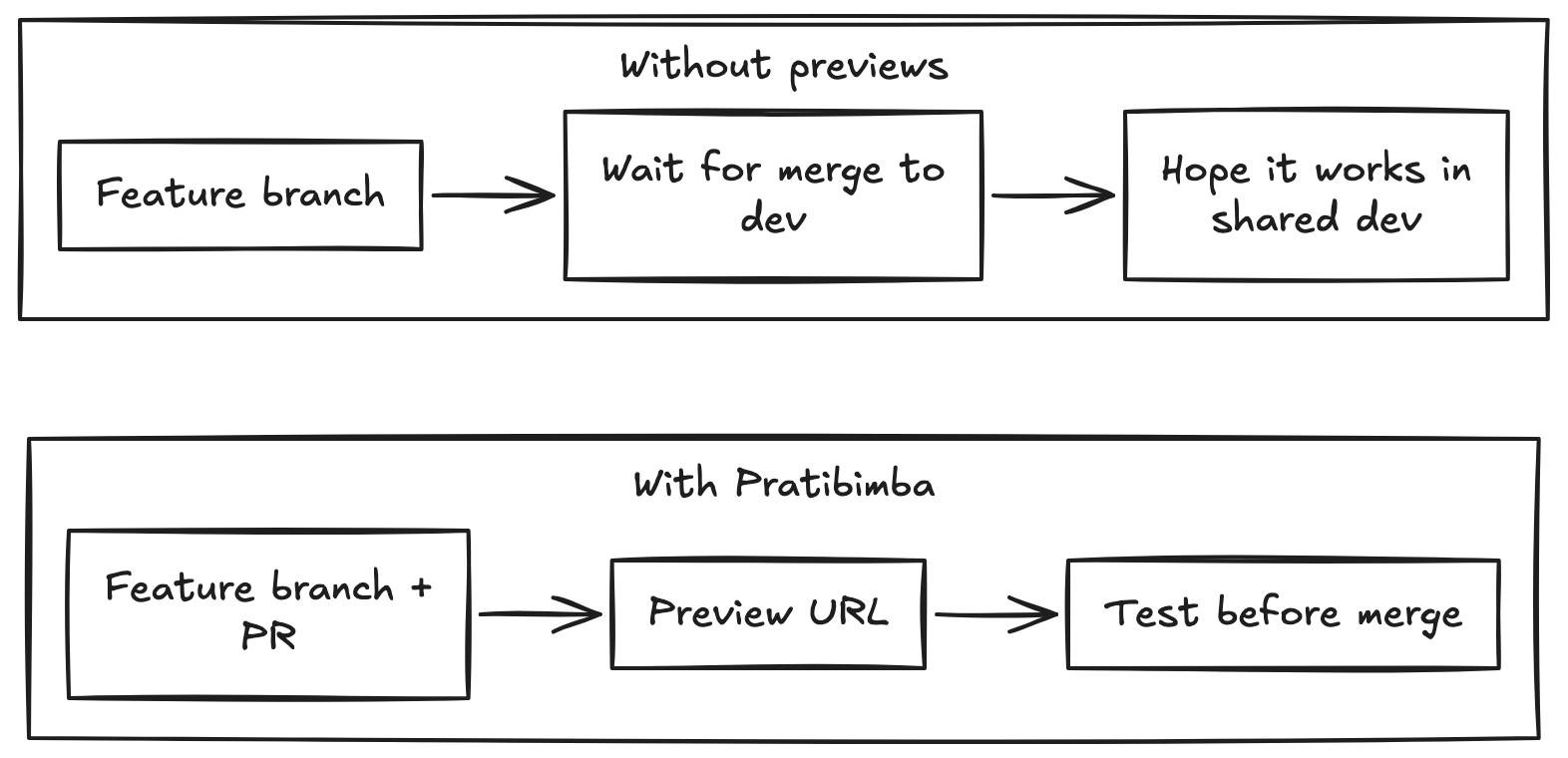
Most teams already have dev → staging → production. But between “works on my machine” and “merge to dev” there is a gap:
You do not always want to deploy a half-baked branch to the shared dev environment. Spinning up ad-hoc environments by hand does not scale. Preview tools that replace CI or require heavy app instrumentation create friction. I wanted something self-hosted, Kubernetes-native, and declarative: register a repo once, open a PR, get a URL.
Problem
What I built
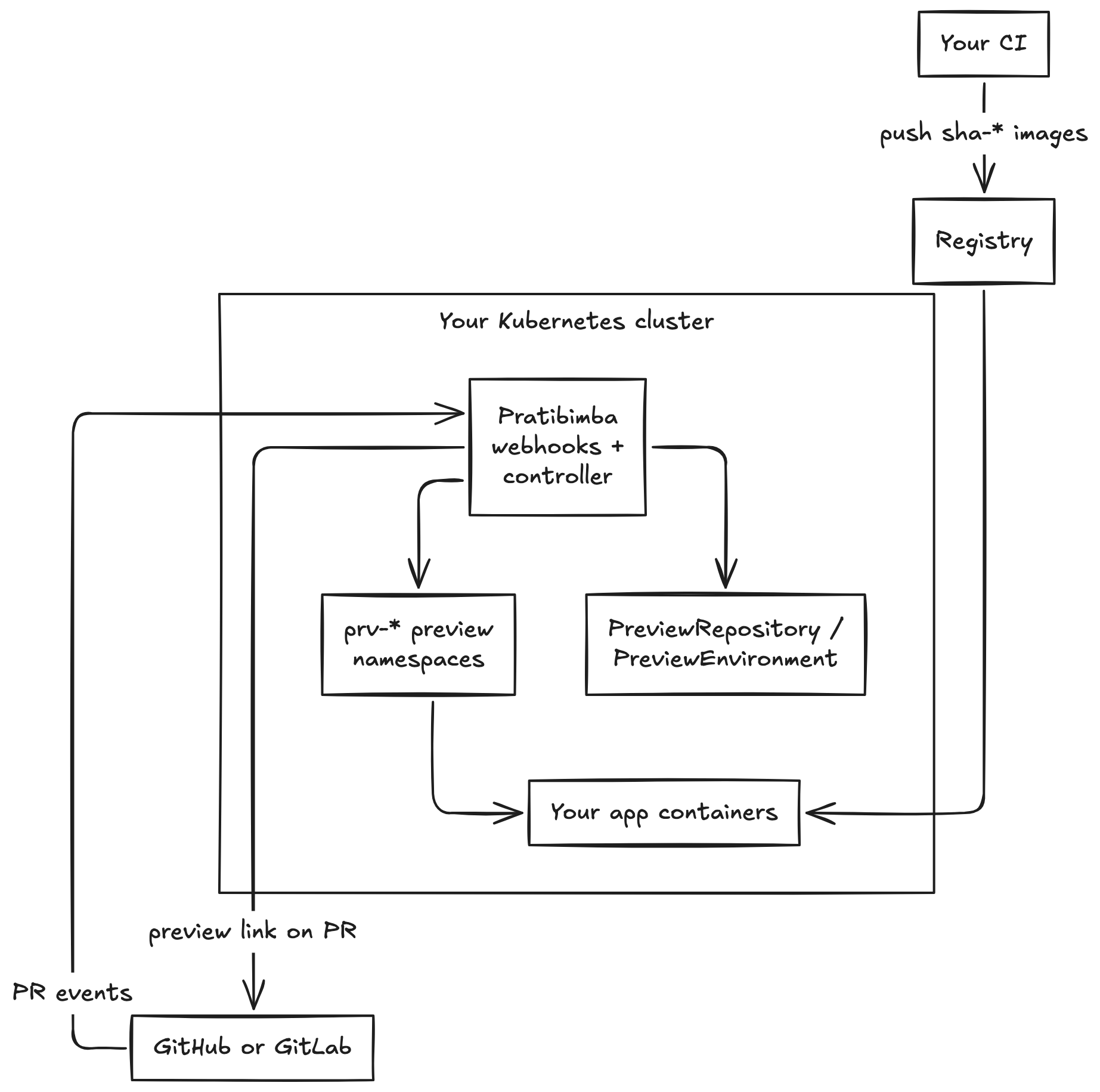
Pratibimba is an open-source (WIP) preview environment manager for GitHub and GitLab:
| Piece | Role |
|---|---|
| Kubernetes operator | Reconciles PreviewEnvironment custom resources into Namespace, Deployment, Service, optional Ingress |
| Webhook server | Same binary; receives PR/MR events, verifies signatures, creates or updates previews |
| PreviewRepository CRD | Platform registers each app repo: image naming, port, env, ingress, TTL |
| PreviewEnvironment CRD | One logical preview per PR/MR number |
| Helm chart | Install, upgrade, uninstall on your cluster |
Explicit non-goals (v1): no web UI, no image building, no replacement of your CI/CD, no database for preview state.
What I built
How a developer experiences it
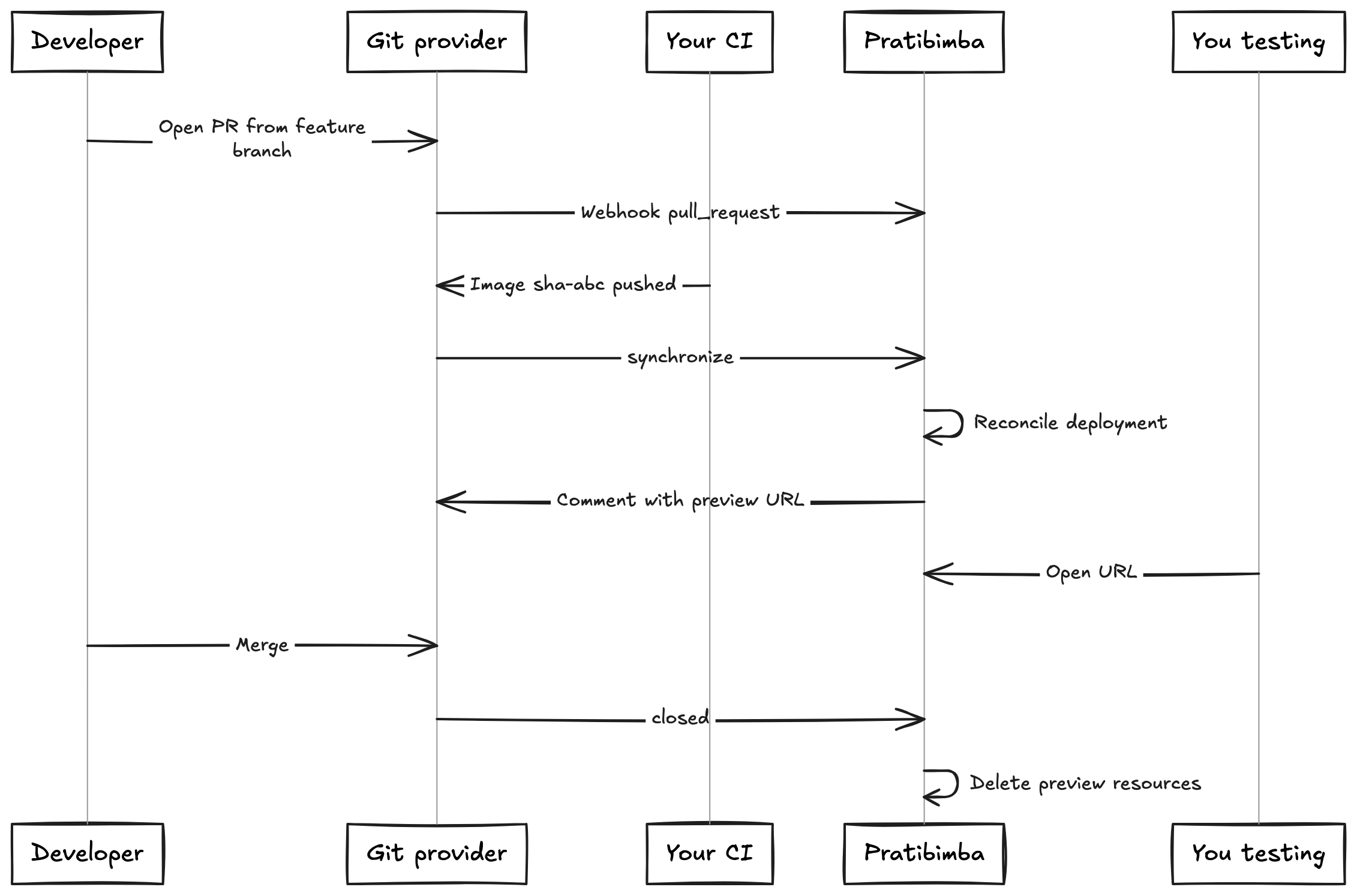
- Work on
feature/todo-filtersfor eg. - Open a pull request toward
devormain. - CI builds and pushes e.g.
ghcr.io/org/todo-api:sha-. - Pratibimba deploys that image to a dedicated preview.
- A comment on the PR (or platform docs) gives you the preview URL.
- You test in the browser or with API clients without polluting dev.
- Merge or close the PR → preview and namespace are cleaned up.
Developer Experience
How a platform engineer experiences it
- Install the Helm chart and CRDs on a cluster you control.
- Configure Ingress, DNS, and webhook endpoints (GitHub App or GitLab project hook).
- For each application repo, apply a PreviewRepository (image template, port, probes, TTL, optional env).
- Hand developers the GUIDE: “Open a PR; use the link.”
Previews are bounded: TTL expiry, resource limits in the CR, ownership labels so cleanup does not touch unrelated namespaces.
Example: todo app with dev, staging, and previews
| Environment | Who deploys | When |
|---|---|---|
| Preview | Pratibimba | Each PR |
| dev | Your normal CD | After merge to dev branch |
| staging / prod etc. | Your normal CD | Your promotion flow |
Preview uses APP_ENV=preview (and ideally preview-only secrets) not the dev database connection string by accident.
The repo includes a minimal examples/todo-app API to exercise the flow.
Tech stack I used for this
- Go, controller-runtime, CRDs
preview.pratibimba.io/v1alpha1 - Single process: controller + webhook HTTP + health/metrics
- GitHub App (HMAC webhooks, PR comments) and GitLab (MR webhooks, notes)
- Local validation: kind + Helm + smoke script under
dev/(this folder)
I am looking for:
- Platform engineers to install it, stress RBAC, ingress, and webhook security, and give feedback on the Helm/DEPLOYMENT path.
- Software Developers to run a real repo (backend or frontend), open PRs, and tell me if the preview URL workflow matches how you actually work before merging to dev.
If you try it, start with the user guide in the repo (docs/GUIDE.md) or ping me with what broke, especially image tags, ingress, and “why is there no preview comment?”
Links
- Repo: Pratibimba
- User guide: docs/GUIDE.md
- Production install: docs/DEPLOYMENT.md